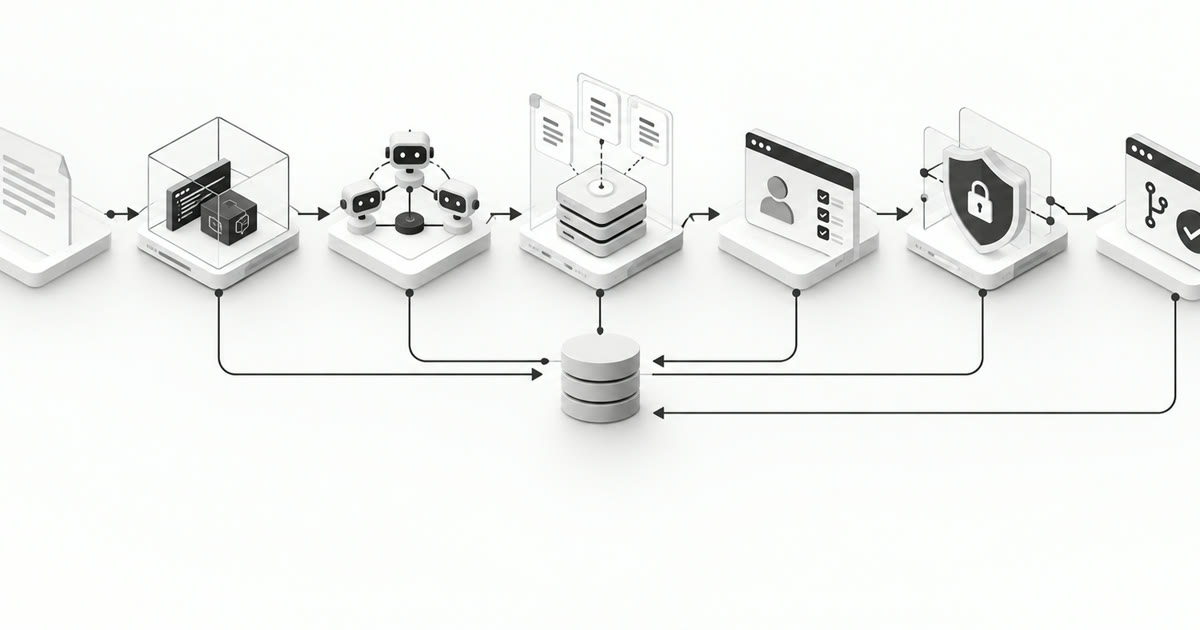
The setup depends on your company. But at a baseline, you need to solve verification, agent coordination, shared context, access, and learning.
How do you build a software factory around coding agents?
Start with one type of change and define the verified PR you expect back. Give the agents a delivery control plane to coordinate work, a context layer for business rules and architecture, a sandbox verification layer to test the change, and governance that limits access and requires the right decisions. Then add automation, reviewed learning, and grading as the workflow proves itself.
I think the setup depends a lot on how big your company is, how your teams work, and how many systems a change touches. You do not need every part of an enterprise platform on day one.
If you are a small team working in one repository, shared skills, a working sandbox, and a short review flow may be enough to start. When the work goes across teams and repositories, you need more structure around who owns what, how agents talk to each other, and who can approve the next step.
Company size is not the only factor. Even a small team working on payments needs to be careful about access and release decisions. Look at what the agents can change and what can break because of it.
I would organize the setup into four layers. They describe responsibilities, not four services you have to build separately.
| Layer | What it owns | What it gives the next stage |
|---|---|---|
| Delivery control plane | Agent and skill definitions, shared sessions, task state, handoffs, and human decisions | A named owner, an approved setup, and a clear next action |
| Context layer | Business rules, architecture, contracts, decisions, and ownership with their sources | The relevant facts and constraints for the task |
| Verification layer | A repeatable sandbox, QA checks, review findings, and evidence | A PR whose tested revision and remaining gaps are visible |
| Governance layer | Permissions, models, tools, budgets, and audit records | Enforced boundaries across the other layers |
An approved request enters the delivery control plane. It draws on the context layer, sends work to agents, and passes their changes through verification. Governance applies throughout, not only at the end. Automation lets requests enter from Slack or Linear, learning updates the shared setup after a run, and grading tells you whether the whole system is actually improving. Those are entry points and feedback loops around the layers.
Here is how I would build each part and test whether it works.
1. Delivery control plane layer | Set up the team and move work forward
You need a shared place to create agents and skills, work together on sessions, and see how the work moves between agents. The control plane manages the approved setup and makes the work visible. Orchestration uses that setup to start tasks, enforce handoffs, and recover when something stops. These are two responsibilities in one delivery system, not necessarily two services.
Set up the agent team and shared workspace
Start with versioned files and a simple interface if that meets your needs. Give people a way to inspect and manage the setup the agents are actually using.
| Component | What to build |
|---|---|
| Agent catalog | Create and version agent definitions with a responsibility, inputs, outputs, model configuration, allowed tools, and assigned skills. |
| Skill library | Create, edit, review, and version reusable procedures. Let several agents use the same skill without maintaining separate copies. |
| Session and run workspace | Show the conversation, current work, owners, artifacts, approvals, and evidence. Let authorized teammates join, steer, or continue the work. |
| Harness configuration | Bring agent definitions, skill versions, workflow rules, context sources, and tool policies into an approved configuration that new runs can load. |
                 Delivery control plane
             Team creates and manages the setup
                            │
           ┌────────────────┼────────────────┐
           ↓                ↓                ↓
     Agent catalog     Skill library    Shared sessions
           └────────────────┼────────────────┘
                            ↓
                Approved harness configuration
                            ↓
                  Workflow orchestration
                            ↓
                Agents execute and exchange work
                  ↙                     ↘
          Shared context          Sandbox and tools
                  ↘                     ↙
                 Results, evidence, and run state
                            ↓
                 Visible in the shared workspace
Let the team create an agent definition, assign approved skills, and make that configuration available to other authorized users. A teammate should be able to join a session, add a constraint, review an artifact, or take over without reconstructing the original conversation. Sharing a session must not grant everyone the original operator’s permissions.
Record the agent, skill, and harness versions used by each run. If someone updates a skill while work is in progress, that run should keep its recorded version unless you deliberately migrate it. Name the agent producing each artifact and the person accountable for material decisions.
If frontend work keeps needing the same browser checks, create a frontend verification skill and assign it to QA. Another engineer can start a run using that approved skill. If you later need a dedicated frontend reviewer, register that agent with its skills and eligible tasks without rewriting the workflow.
Coordinate work and recover interrupted runs
Who calls the next agent? What context gets passed? If Code Review finds an issue, how does it get back to Implement? When does a person need to step in? And what happens if the session stops in between?
Let an agent suggest what needs to happen next. The orchestration rules should check dependencies, permissions, and required approvals before starting that work.
- Record who owns the work and what it needs. Store the run, task, accountable agent, input artifact revisions, expected outputs, allowed tools, and attempt identity. Give completed, blocked, waiting for approval, and failed distinct outcomes.
- Make the handoff specific. A review finding should reference the requirement, code revision, evidence, and requested correction. Return it to the responsible implementation task. Preserve the exchange so later reviewers can understand why the code changed.
- Pause at human decision gates. For a material change, send the requirements or design revision, the open question, and the agent’s evidence to a named owner before implementation moves on. The owner can approve it, request a revision, redirect the work, or stop it. Record the decision against that artifact revision and return feedback to the responsible agent. If the artifact changes materially, reopen the approval. A bounded fix can pass without an intermediate human gate when the team has configured that path, but it still needs the required review and verification.
- Handle retries and interrupted work. Persist state outside chat history. Give dispatch commands idempotency keys so duplicate events do not create duplicate work. Reject stale completions from earlier attempts and expose an explicit resume, retry, repair, or stop action.
For the project-access example, have an owner settle whether revocation cancels queued exports while the work is still in requirements or design. If the owner changes that rule, send it back to the relevant agent and hold dependent implementation work. The person is judging a consequential decision, not watching every agent action.
A code reviewer may discover that security review is needed. Resolve that proposed task against eligible agents and policy, then record its dependencies. The agent can discover more work, but your platform still decides whether that work can start. A failed API check with an identified owner should return directly to that task. For larger work, architecture can propose frontend, backend, and worker tasks, then join their results before integrated verification.
Separate the lifetimes of the agent session, sandbox, and running harness version. Define when an environment pauses or expires, what state survives its loss, and how an active run behaves when you release a new harness. Pin versions or use an explicit, compatible migration path. Do not resume an old run under changed instructions without recording that change. Across repositories, keep compatible code revisions and combined verification evidence visible in the same workspace.
The Coordination Backbone explains work contracts, typed outcomes, an agent registry, and transition policies. Use it when connecting shared agent definitions to durable, authorized work.
Ready when one teammate can create a skill, assign its approved version to an agent, and start a run while another authorized teammate can join and inspect the setup and evidence. Test that a material design decision pauses for its owner, feedback reaches the right agent, and only the approved revision moves forward. Then interrupt the run, resume the correct attempt, deliver a completion event twice without duplicate downstream work, and return a review finding to Implement without losing its history. Reject a stale result before enabling parallel execution.
2. Verification layer | Build a reproducible sandbox
For me, this is the most important part. Your QA agent needs an environment where it can bring up the application, test the change, see what failed, and send it back for a fix.
You can write a detailed QA prompt. But where is the agent going to validate the change?
Take a hypothetical change to project access across a frontend, API, and background worker. When a user loses access, the project should disappear from their view, subsequent API requests should be rejected, and a queued export should respect the updated permission. Separate repository tests may leave those interactions unchecked.
- Make the environment repeatable. Record the repository revisions, dependencies, configuration, startup commands, and health checks needed to run the affected services. Use isolated test data and credentials. Put those steps in a setup script or skill that an agent can run from a fresh workspace. You should not have to join every session to explain how to start the app.
- Give QA the data and tools to test. For this change, seed a project, users with different roles, and a queued export. Give Verify the browser, API access, and logs needed to exercise the acceptance criteria. Record which dependencies are simulated and which boundaries remain untested.
- Close the feedback loop. Have Verify return the failing scenario, tested revision, expected behavior, observed result, and evidence to Implement. After a fix, rerun the affected checks against the new revision. Let that loop run more than once if needed. Set a limit and make it clear when the agent needs to ask for help.
Choose checks for the behavior. A focused test can check the permission rule quickly. An API check can establish rejection. A browser flow can show the user experience. Use broader regression checks when the impact is uncertain.
Measure both time to detect a failure and time to locate and fix it. A long test ending with “access flow failed” leaves the agent a large search space. Record the failing request, role, expected response, and relevant logs so it can identify which boundary broke. My testing feedback-loop post explains how to use those two measures when choosing between focused tests and broader integration checks.
When the work comes back to you, the PR should include the requirement, the code revision tested, the environment, the checks, and what is still unverified. If environment startup fails, report verification as blocked. If a test account or seed record was missing, repair the environment recipe and rerun from a fresh workspace. Capture the improvement in the shared setup skill so another run does not depend on the same manual repair. A passing check from an earlier revision cannot validate code changed afterward.
For a concrete example of why the integration environment matters, my April software-factory essay describes a producer emitting created_at while its consumer expected createdAt. Tests passed in isolation. An integration test caught the mismatch in the sandbox. The example shows the boundary your verification setup needs to exercise.
Ready when an agent can start a fresh sandbox, reproduce an intentionally introduced failure, pass an actionable finding to Implement, and verify the corrected revision with inspectable evidence. Run this exercise in a disposable test branch. Keep production rollout checks as a separate responsibility.
3. Context layer | Create a shared baseline for the team
You want agents and humans to work from the same baseline. Otherwise, each session starts with a different understanding of the product and someone has to keep correcting it.
- Write down the context agents keep needing. Start with domain rules, architecture, service contracts, ownership, engineering conventions, and accepted decisions. For the access example, settle whether revocation cancels queued exports and what audit records must remain. You want the agents to understand that business rule before they start implementing it.
- Keep the source and owner with the context. Keep its source, owner, applicable system, and freshness visible. Define which source is authoritative when records conflict. Retrieve relevant context within the requester’s permissions instead of loading every conversation into every prompt.
- Version shared skills. Store reusable review, implementation, and verification instructions where the team can maintain them. Record the skill versions used by each run. Link requirements, plans, findings, and evidence to the same change record.
Start with versioned documents and a decision log if they answer your retrieval needs. As questions span more systems, structured facts and relationships can help connect rules, owners, services, and historical decisions.
Keep business context separate from generic instructions. A rule about queued exports belongs in domain knowledge. The method for checking downstream consumers belongs in a skill. That separation makes both easier to maintain.
Give instruction files clear ownership too. Keep project orientation and navigation short. Put task procedures in skills, reference material in topic documents, and critical constraints in scoped policy with executable checks where possible. Maintain an index showing which file owns each concern. When several files repeat the same rule, consolidate them before adding more instructions.
Connect the domain facts to the verification path. For example, link the access-revocation rule to its API contract, background consumer, and test scenario. An agent investigating that rule should be able to discover both the affected components and the checks that exercise it.
My Prinevo Memory architecture article explains structured facts, relationships, and time when you need to design that connected knowledge layer. The context-tiering article offers a classification for deciding which instructions belong in orientation, skills, or reference material. Adapt that classification to the harness you use.
Ready when a fresh agent session can retrieve the applicable domain rule and current contract with their sources, and another authorized teammate can use the same skill version. Give it an outdated decision as well and check that the conflict is surfaced or resolved against the authoritative record.
4. Governance layer | Scope models, tools, and environment access
The harness is the operating setup around the model, including instructions, skills, tools, context access, and execution rules. Make those choices explicit and versioned.
Treat agents as first-class actors. The system should know which agent did the work, who asked it to act, and what authority it used. Do not hide every agent action behind one person’s account or a shared token.
- Give each agent an identity and role. List the repositories, tools, environments, and operations it needs. Give QA sandbox access and relevant logs. Keep production write access outside that role unless a separately authorized task requires it.
- Support delegated and direct access. When an agent acts for a person, use the integration’s supported delegation flow and limit the grant to that person’s allowed actions, the task, and its lifetime. When an agent performs independently authorized work, use its own scoped identity and permissions. If one agent delegates a subtask to another, give the receiving agent a new grant for that task rather than inheriting the first agent’s full access. Record the agent, requesting person or team, authority used, and approval in each case. If an integration cannot enforce delegation safely, do not substitute a broad personal token.
- Enforce the boundary. Use scoped credentials and permissions in the underlying services. As integrations grow, a tool registry or MCP gateway can centralize allowed tools, restrictions, and audit records. Ensure shell access or another integration cannot bypass the restriction. The MCP authorization specification provides a reference for scoped authorization.
- Configure model choice and operating limits. Select models by task, record model and harness versions, and set time, retry, and cost limits. Route exceptions to an owner. Keep a way to stop a run and revoke its access.
Models will keep changing. You may want one model for architecture and another for a small fix. Keep the context, skills, and handoff rules in the shared setup so you can evaluate a new model without rebuilding everything around it. Compare total effort and quality before switching. A cheaper call that creates more reviewer rework may cost more overall.
Keep secrets out of shared memory. Treat retrieved documents and tool responses as data that cannot grant themselves additional permissions.
Ready when a delegated agent can perform only the actions its requester could authorize, an independently authorized agent can use only its own scoped access, and both paths identify the agent and authority in the audit record. An unauthorized operation must be denied, and revoked access must stop working. Test denied operations against a controlled fixture rather than attempting a destructive production action.
5. Learning loop | Improve the setup with evaluation and rollback
How do you make sure what you learned in one session is available in the next? And how does that learning improve the setup itself?
I would separate this into two parts. One is memory, where you retain facts and decisions about your domain. The other is changing how the agents work, through skills, checks, or workflow improvements.
- Save the facts and decisions you want to reuse. Capture a learned domain rule or decision with its source, scope, owner, and evidence. Review it before promoting it to shared context. When a rule changes, supersede the old record while preserving the history.
- Propose changes to the harness separately. If agents repeatedly miss background consumers, propose an update to the impact-analysis skill, a regression check, or a handoff rule. Version that proposal and explain which observed failure it addresses.
- Run evaluations before making the change shared. Compare the proposed setup with the previous version on representative tasks. Check the original failure and other workflows the change could affect. Review the results, promote accepted changes, and retain a rollback path.
For memory, check whether a later session retrieves the correct fact with suitable evidence. For harness changes, check whether behavior improves without unacceptable regressions. Saving a transcript or adding another instruction does not establish either outcome.
Keep proposed learning visible even when it is rejected. The next person investigating the same problem should be able to see what was tried and why it was not adopted.
Inspect the handoffs as well as the final output. Start with a separate review of the run trace. Look for implementation starting before approval, repeated validation failures, and lost findings. Classify each finding as missing knowledge, a setup defect, a skill gap, or an orchestration problem before choosing the fix. A separate observer agent can take on that responsibility as the volume of runs grows.
For the missing-seed-data example, propose a setup-skill change and evaluate it by starting a fresh sandbox. For the contract mismatch, add a boundary check and record which producer and consumer it covers. Updating only a memory note would leave the executable gap open.
My June notes on observer agents explain the reason for separating observation from task execution. A worker focused on finishing its own task can miss a failure between stages. The compounding-systems essay develops the next step, turning recurring corrections into changes to the shared setup. That is the loop you want. See what went wrong, decide where the learning belongs, evaluate the change, and then update the shared setup.
Ready when a later session uses an approved fact without manual prompting, superseded knowledge is handled correctly, and a proposed skill change can be evaluated, accepted or rejected, and rolled back. Claim reduced recurrence only after observing subsequent comparable runs.
6. Automation entry points | Start the workflow from Slack or Linear
Give people one place to ask for the work. That can be an approved Linear ticket or a request in Slack. Both should start the same delivery system, with the relevant context, permissions, and workflow attached. You should not have to open a separate session for every agent and pass the work between them yourself.
You should be able to run different workflows depending on the work. A small fix should not need the same process as a feature that changes APIs, data, and several services. Sometimes you only want to call Code Review or Verify on work that already exists.
| Workflow | Use it for | Configure |
|---|---|---|
| Quick Lane | Bounded changes with agreed acceptance criteria | Implement, Code Review, Verify, and required action permissions |
| Full Lane | Features needing product decisions, design, or coordination across systems | Requirements, architecture, planning, approvals, implementation, review, and verification |
| Individual agent | A focused review, investigation, or verification task | Relevant context, scoped tools, expected evidence, and a completion condition |
- Decide when to use each lane. Decide what qualifies for Quick Lane and which discoveries require a pause or a fuller workflow. Keep review and verification findings connected to the responsible implementation task across repeated corrections.
- Let people start work from their existing tools. Map an approved Linear ticket or an authorized Slack request to the project, requester, workflow, and allowed scope. Preserve the original request and acceptance criteria. Handle duplicate events by returning the existing run.
- Show what is happening. Expose the current owner, blocker or approval needed, evidence, and final PR through the appropriate interface. Check who can see the result before posting it back to a shared channel.
For example, configure an approved Linear bug ticket to start Quick Lane. The system picks up the ticket, retrieves the relevant context, and calls Implement. Code Review can send findings back for another fix. Verify brings up the sandbox, tests the change, and returns failures to Implement until the required checks pass or the run needs help. When verification passes, the workflow opens or updates the PR with the evidence and returns the link to the ticket.
A Slack request should be able to start the same workflow, or call one agent for a specific task. Keep the run connected to that request so the person can see progress, answer a question, or steer the work without carrying context between separate chats.
Approved Linear ticket or authorized Slack request
      → shared context and selected workflow
      → Implement ↔ Code Review
      → Verify ↔ Implement
      → PR with verification evidence
      → result linked to the original request
That is the automation you want to build. The request starts the work and the system handles the agent handoffs. People step in for the decisions and approvals you configured, or when something is blocked. Keep merge and production release under the team’s release policy.
A Quick Lane can proceed without intermediate human gates where policy permits. Tool permissions and the agreed completion condition still apply. If a small fix reveals an unresolved product decision, surface that change in scope.
Ready when an authorized ticket or Slack request starts the configured workflow and reaches a PR with evidence without someone manually calling each agent. Check that approvals still pause the run, blockers return to the requester, a repeated event resolves to the existing run, and an individual-agent request stays within scope. The final handoff should link back to the original request.
7. Grading | Check the results before expanding
Choose a recurring change type and agree on what counts as completed before the pilot starts. Be clear whether you are measuring a verified PR or a change delivered to production.
- Record the baseline. Capture the current human effort, lead time, review work, and common failure points for comparable changes. Include setup work and task complexity.
- Track the effort across the whole run. Measure human minutes, interventions, first-pass and eventual verification rates, rework after reviewer handoff, elapsed time to a verified PR, and compute cost. Count blocked, failed, and abandoned runs. Record unresolved verification gaps.
- Change the setup deliberately. Evaluate a new model, skill, or workflow against the previous version using representative tasks and recorded configurations. Check both the intended improvement and regressions. Take on more work when the results give you confidence.
Track repeated corrections as well. If people still supply the same setup repair or domain instruction after it was promoted, inspect whether the next run retrieved and applied it. Fewer reminders are a useful signal, provided the required behavior is still being verified.
For a small team, the first implementation may be a shared setup over existing tools. Multiple teams may need centralized access policy, a larger agent catalog, more execution capacity, and stronger audit controls. Add those parts as you need them. You do not have to build all of this at the same scale on day one.
Ready when you can account for the whole reviewer handoff, explain where people still intervene, and compare setup versions without hiding failures or extra human work. Use those results to decide whether to expand, fix a specific layer, or keep the workflow bounded.
Connect the components into one delivery system
Get the loop working for one type of change first. Can the agents coordinate, run the app, fix what fails, and hand the work back with evidence? Can another person see what happened and steer it? Start there.
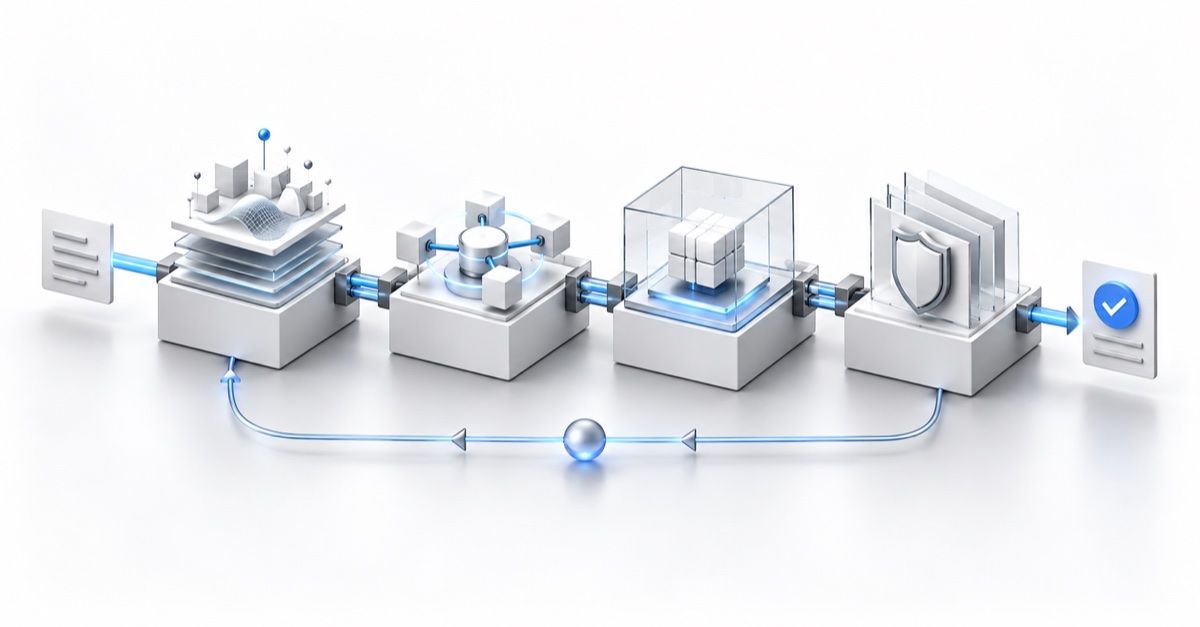
To see how these parts fit together, use the architecture walkthrough. It connects shared context, the specialist agent team, governance, sandbox verification, and reviewed learning. The delivery stages have accountable human owners, specialist agents, controls, and expected outputs.
The delivery control plane decides how work moves. Context supplies what agents need to know. Verification checks the resulting change. Governance limits what can happen at every step. Learning changes those layers only after review, while grading measures whether the changes helped. That is the layered system behind the workflow, not seven separate services.
Start with what your team knows.
Retrieve the decisions, contracts, owners, and prior evidence relevant to this request.
- Owner and agents
- Team owner + Memory agents
- Input
- Connected sources and approved memory
- Control
- Scoped read access and freshness checks
- Output
- Source-linked context bundle
Decide what needs to change.
Product and Architect agents define scope, acceptance criteria, affected systems, dependencies, and a verification path.
- Owner and agents
- Product owner + Product and Architect agents
- Input
- Request, context, and system contracts
- Control
- Cost limit and human scope gate where needed
- Output
- Approved plan and dependency map
Make compatible changes together.
Lead and specialist agents coordinate implementation across repositories using the same plan and contracts.
- Owner and agents
- Tech lead + Lead and specialist agents
- Input
- Approved plan and repository conventions
- Control
- Least-privilege tools and sandbox limits
- Output
- Compatible changes and an action trace
Prove the change works.
QA and Code Review agents check behavior in a sandbox. Failures return to the responsible agent before the reviewer receives the PR.
- Owner and agents
- Reviewer + QA and Code Review agents
- Input
- Acceptance criteria, changed surfaces, and risks
- Control
- Required checks and a block on missing evidence
- Output
- Verified PR with tests, logs, screenshots, and review evidence
Improve the next run.
A domain owner reviews evidence and decisions before promoting reusable memory, regression tests, or workflow changes.
- Owner and agents
- Domain owner + Learning agent
- Input
- Run trace, reviewer decisions, and rollout results
- Control
- Source, scope, freshness, and promotion review
- Output
- Approved memory, checks, and versioned policies
Use this architecture to decide where each responsibility belongs, then choose the stages and gates your workflow needs. The agent catalog, skill library, and shared sessions support the team working through it. Code Review and Verify can return work to Implement as described above. A small fix can take a shorter path while keeping the context, permissions, and verification it requires.
Prinevo.ai gives you these foundations out of the box. Your agents work with shared context and skills, coordinate across repositories, verify changes in a sandbox, and feed reviewed learning back into the setup. You choose the models, access, owners, and gates, and stay in control of the work.
Connect your repositories and tools, establish the domain context and runnable environment, and choose the owners and approval rules that fit your team. Then evaluate one representative change from your backlog, including what the reviewer receives and what the next run can reuse.